
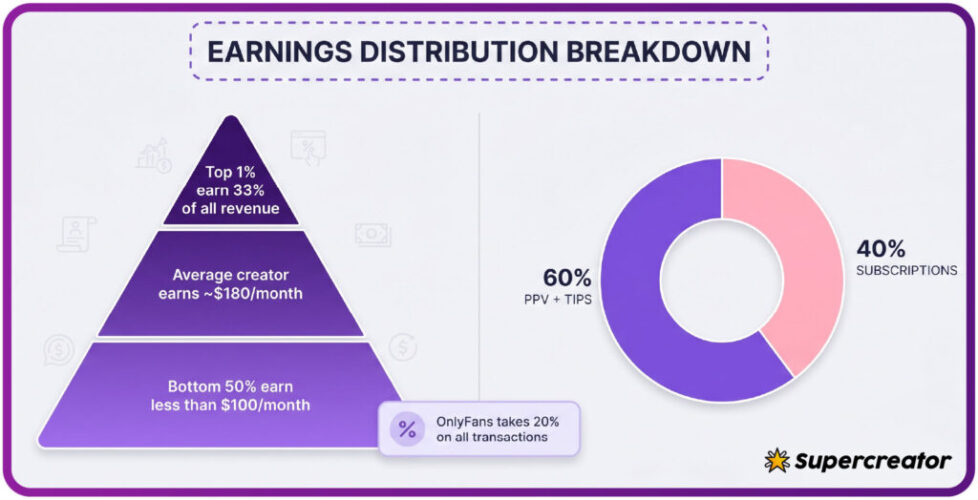
Most subscribers expect one monthly charge and are surprised when the bank statement shows three or four lines from OnlyFans. The direct answer is that a subscription fee is just the starting point — pay-per-view messages, tips, and custom content can each trigger a separate card hit, and every single one of those transactions carries a 20 percent platform fee baked into the price you pay.
This guide names every charge type, explains exactly what triggers each one, and gives you a method for estimating your real monthly total before it arrives.

Every Charge That Can Reach Your Card
OnlyFans has several distinct billing events. Each one is separate, each one posts as its own transaction, and none of them cancel out any other.
- Base subscription — charged when you first subscribe; ranges from $4.99 to $49.99 per month on paid pages. A promotional first month can be lower, but renewal reverts to the full listed price.
- Auto-renewal — the same subscription amount charged again on your billing anniversary, every cycle, even if you never open the site.
- Bundle subscription — a 3-, 6-, or 12-month prepayment at a reduced monthly rate; charged as one lump sum up front.
- Pay-per-view (PPV) message unlock — a charge triggered the moment you tap to unlock a locked message in your inbox; capped at $50 per message.
- Tip on a post or profile — a voluntary extra; up to $100 during a creator’s first four months on the platform, up to $200 after that.
- Paid chat message — some creators charge per message sent or received in DMs, commonly $3–$5 each.
- Custom content order — a negotiated one-off charge; photo sets typically $10–$30, videos typically $20–$50, fully custom videos often $50–$100 minimum.
Every one of these amounts already includes OnlyFans’ 20 percent cut. You never see that split — it happens on the creator’s side — but it shapes the pricing strategy you encounter.
The Charge Reference
| Charge | Amount or cap | What triggers it |
| Base subscription | $4.99–$49.99/mo | Clicking Subscribe on a paid page |
| Promo first month | Can be below $4.99 | Subscribing during an active promotion |
| Auto-renewal | Same as base rate | Billing date arriving with auto-renew on |
| Bundle (3/6/12 mo) | Reduced per-month rate, paid upfront | Selecting a bundle option at checkout |
| PPV unlock | Up to $50 per message | Tapping unlock on a locked inbox message |
| Tip | Up to $200 (up to $100 first 4 months) | Sending a tip on a post, profile, or in chat |
| Paid chat message | Commonly $3–$5 each | Sending or receiving in a paid-message chat |
| Custom content | $10–$100+ depending on type | Agreeing a price and confirming order |

Why the Subscription Is Only the Floor
Because the platform keeps 20 percent of every transaction, creators who set a modest subscription price have a strong incentive to offer paid extras. A $7 monthly page that also sends three PPV messages a week at $10 each can generate far more revenue per subscriber than a $30 flat-rate page. The subscription price you see on a profile is therefore the minimum you will spend, not an estimate of the total.
This matters practically. The mid-market majority of paid pages sits between $6 and $10 per month, which sounds manageable. But subscribers who regularly unlock PPV messages or send tips on several pages can easily spend three to five times their combined subscription costs. BestOnlyFans, a service that tracks prices and promotions across the platform, notes that extra-content spend often outpaces subscription spend within the first two months for active users.
Predictable Versus Elastic Spend
| Charge type | Predictable | Elastic |
| Base subscription | Yes — fixed monthly amount | No |
| Auto-renewal | Yes — same date, same amount | No |
| Bundle payment | Yes — one upfront total | No |
| PPV unlock | No | Yes — depends how many you open |
| Tip | No | Yes — entirely discretionary |
| Paid chat message | No | Yes — scales with conversation volume |
| Custom content order | No | Yes — negotiated case by case |

Charges People Forget About
- Auto-renewal on pages you rarely visit — the charge posts whether you opened the page that month or not.
- Promo price expiry — a discounted first month at below the $4.99 base renews at the full listed rate; many subscribers do not notice until the second charge.
- PPV unlocks inside chat — locked messages arrive in your inbox like ordinary DMs; the charge triggers the instant you tap to view them.
- Per-message chat fees — easy to miss on pages where messaging looks like a free feature until a charge appears at checkout.
- Tips sent during a live stream — these post immediately and are non-refundable like every other charge.
- Bundles that reset the billing cycle — buying a bundle mid-month may shift your renewal date forward, causing two charges in a short window.
Important: OnlyFans does not issue refunds on processed charges. If auto-renew fires before you cancel, that money is gone. Cancel at least 24 hours before your renewal date to be safe — go to the profile icon, choose Subscriptions, find the creator’s card, and toggle Auto-Renew off.

Working Out Your Real Monthly Total
- List every page you are subscribed to and note the exact renewal price (not the promo price you first paid).
- Note each renewal date so you can see which charges land in the same calendar month.
- Count how many PPV messages you typically unlock per page per month and multiply by the average unlock price.
- Add any per-message chat fees, estimating your usual conversation volume on pages that charge for DMs.
- Include a realistic tip figure based on the last two months of activity.
- Add up the subscription total plus the extras total — that combined figure is your realistic monthly spend.
If you subscribe to pages from a best onlyfans list, check whether those pages are promo-heavy, since the renewal price after month one can be significantly higher than the entry price shown on the list.
Signals Your Total Is Drifting
- Your statement shows more OnlyFans lines than the number of pages you subscribe to.
- A renewal charge is higher than you remember paying last month.
- You are unlocking PPV messages without checking the price before confirming.
- You have active subscriptions on pages you have not opened in over a month.
- Your total spend this month is more than 20 percent above last month with no new subscriptions added.

Keeping the Total Where You Want It
A few habits make a meaningful difference over time. BestOnlyFans publishes regular price and promotion data that can help you time subscriptions to catch discounted first months, which reduces the base cost before extras even enter the picture. For pages you are unsure about, look for a free page or a trial before committing to a recurring subscription.
- Set a monthly ceiling and track it in a notes app or spreadsheet updated after each transaction.
- Review your active subscriptions every two to four weeks and cancel any page you have not opened since the last review.
- Before unlocking a PPV message, check the price shown at the confirmation step — do not tap through automatically.
- Turn off auto-renew on pages you are uncertain about immediately after subscribing; you can always re-enable it.
- Use bundle pricing only when you are confident about a page — a 3-month bundle locks in spend you cannot recover if your interest fades.
- Check BestOnlyFans for promotional windows before subscribing to a new page at full price.
Exploring best new onlyfans pages during their launch promotions is one way to lower entry cost, since newer pages often run discounted first months to build subscriber counts quickly.

FAQ
Can a creator charge me more than the listed subscription price?
No — the subscription renews at the price shown on the page when you signed up, and if a creator raises the price later, existing subscribers keep their original rate while only new subscribers pay the higher amount.
Why did I get charged twice in one month?
Two charges in a single calendar month usually mean either a PPV unlock or tip posted alongside your regular renewal, or that you bought a bundle mid-cycle which shifted your billing date and created a short gap between two renewal charges.
Is there any way to get a refund on an OnlyFans charge?
The platform’s stated policy is no refunds on processed charges, which covers subscriptions, PPV unlocks, tips, and custom content — cancelling auto-renew stops future charges but does not recover money already taken.
What is the difference between cancelling and unfollowing?
Cancelling (disabling auto-renew) stops the next renewal while letting you keep access until the current paid period ends; unfollowing removes access immediately, so choose the cancel-only option if you want to use the time you have already paid for.